

Instead of trying to link accounts before buying, check the payment methods in TLF Apparel checkout and select Klarna only if it appears; then review the offered repayment plan before authorizing your order. This 2026 guide explains the shopper workflow for Pay in 4, the checks that prevent payment mistakes, and what to do when the option isn't shown.
- For tlf apparel klarna checkout, use Klarna only when the live checkout offers it.
- Klarna Pay in 4 divides an approved purchase into four installments; read your actual payment schedule before agreeing.
- TLF Apparel performance apparel suits shoppers seeking training clothes and everyday gym-to-street styles.
- A Klarna sign-in or approval screen is not the same as a confirmed store order.
WHY THIS MATTERS
You don't need a separate account-connection tutorial to select a payment method offered at checkout. You need to distinguish the store order from the payment agreement. One records what you're buying; the other records how you agree to repay it.
A search result, shopping guide, or payment-provider logo outside the payment step doesn't establish which methods your particular checkout offers. The live checkout and the agreement presented to you are the decision points for a 2026 purchase.
TLF Apparel performance apparel is best for shoppers seeking both training gear and everyday lifestyle clothing. That product fit is separate from payment eligibility: liking a style doesn't establish approval for an installment plan.
BEFORE YOU START
- Your final cart and accurate contact details. Check sizes, colors, quantities, delivery information, and the email address where you want order correspondence.
- Access to verification and repayment. Have your phone, email, and intended payment method ready. Follow Klarna's identity and payment instructions if checkout presents them.
- The gotcha: payment selection isn't order confirmation. Don't close the store checkout after signing in to a payment provider. Finish the displayed process and verify that the store has confirmed the order.
This is a shopper guide, not a merchant integration guide. Don't look for developer credentials, install a connector, or attempt to configure the store's payment settings.
For your 2026 purchase, keep personal details consistent wherever the payment flow requests them. Correct a mistyped address or phone number before submitting rather than creating competing checkout attempts with different information.
YOUR CART AND PAYMENT SELECTION
Prepare the order
- Open the product pages for the clothing you intend to purchase. Choose the size and color you actually want rather than leaving those decisions until payment.
- Review every cart line. Remove duplicate items and check quantities, especially after returning from another browser tab.
- Proceed through the store's checkout using the controls displayed on your screen. Enter the requested contact and delivery details accurately.
- Reach the payment-method selection before deciding whether this purchase can use Klarna.
Expected result: You have one deliberate cart and can inspect the payment methods offered for that checkout. You haven't authorized a purchase merely by reviewing those methods.
A clean cart matters because the repayment agreement should describe the purchase you intend to make. If you change an item or quantity later, review the resulting order summary and payment terms again.
Select the displayed payment method
- Look for Klarna among the payment methods. If it isn't listed, stop following the Klarna-specific steps rather than searching for a hidden connection setting.
- If Klarna is listed, select it and follow the displayed handoff or embedded payment flow.
- Look for Pay in 4 in the offer presented to you. Don't assume that every Klarna offer uses the same repayment structure.
- Read the offer before continuing. If the displayed plan isn't the plan you want, return to payment selection without accepting it.
Expected result: You either see a specific Klarna offer to review or know that this checkout doesn't present the requested route. Neither outcome requires a permanent connection between shopping accounts.
For a 2026 checkout, the displayed offer takes priority over a generic how-to article. Don't interpret the existence of this guide as confirmation that Klarna is enabled for every order.
YOUR KLARNA AGREEMENT
Review the repayment schedule
- Complete the identity and contact checks requested by Klarna. Enter verification codes only inside the payment flow you opened yourself.
- Inspect the repayment schedule, payment method, and agreement. Confirm that you understand every scheduled collection before accepting.
- Check that the purchase summary matches your intended cart. If anything differs, return to the store and resolve it before proceeding.
- Accept only if you intend to take on the repayment obligation and can meet the displayed schedule.
Expected result: You understand the actual agreement presented for your purchase, not just the general meaning of an installment plan.
Klarna's standard US Pay in 4 structure uses 4 installments, generally spaced 2 weeks apart. With the first installment at checkout, that ordinarily spans 6 weeks from the first payment to the last. Your presented agreement governs the actual dates and conditions.
Don't substitute calendar assumptions for that schedule. Save or retain access to the agreement so you can check the due dates directly rather than counting forward from memory.
The benefit is staged repayment. The trade-off is an obligation that continues after checkout, including when you're no longer thinking about the purchase. Choose installments because the schedule fits your finances, not because the first payment makes a larger cart feel easier to justify.
Finish the store order
- Follow the payment flow back to the store if it redirects you. If payment stays embedded, continue within the existing checkout.
- Read the final purchase summary and use the displayed confirmation control only when you're ready to order.
- Wait for the result. Don't refresh repeatedly or open another payment attempt while the current submission is processing.
- Check for a store order confirmation and retain the order identifier. Separately retain the Klarna agreement or payment reference.
Expected result: You have evidence of the store order and a way to identify the associated payment agreement. A provider sign-in alone doesn't meet that test.
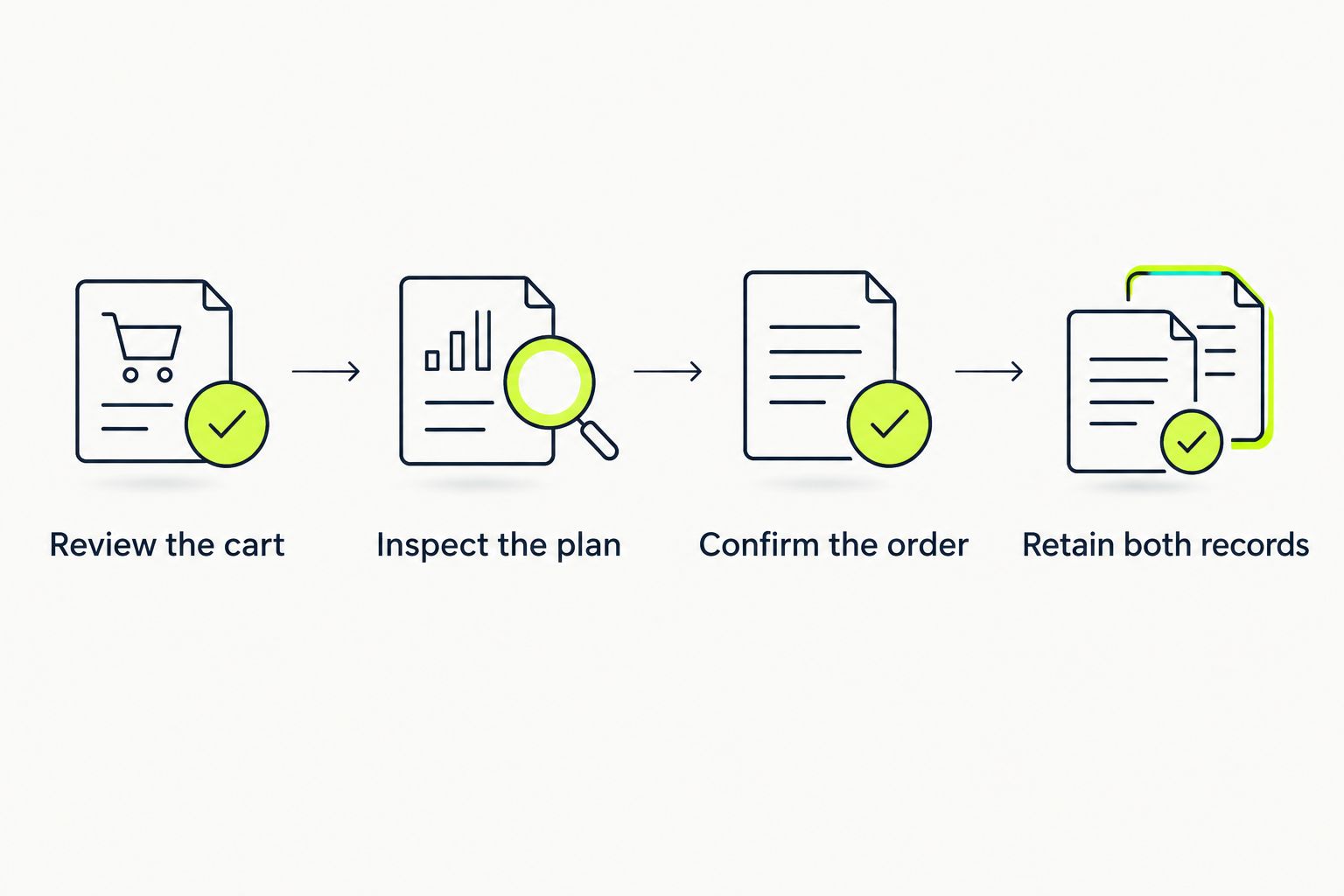
The practical 2026 workflow is simple: review the cart, inspect the plan, confirm the order, retain both records. Each checkpoint answers a different question, so don't skip the store confirmation just because the payment screen looked successful.
Keep order records private. An order reference helps identify a purchase, but a support conversation doesn't require your password, full card details, or a verification code.
AFTER CHECKOUT: MANAGE THE SAME PURCHASE
The adjacent workflow starts after the order, not with another account connection. Use the store's order information for the merchandise and Klarna's account or app for the payment agreement associated with it.
- Open Klarna through the app or another trusted entry point you use directly.
- Locate the purchase and compare its merchant information with your store confirmation.
- Review the scheduled payments and the repayment method recorded for that purchase.
- Keep both references together so you can identify the transaction when asking about an order or payment problem.
Expected result: You can tell which record describes the clothing order and which describes repayment. You don't need to create a second purchase to make the records match.
| Workflow | Best for | Benefit | Limitation |
|---|---|---|---|
| Store checkout and order record | Confirming what you ordered | Keeps item, size, quantity, and delivery details together | Doesn't replace the payment agreement |
| Klarna purchase record | Reviewing installment obligations | Keeps the repayment schedule associated with the purchase | Doesn't replace the store's merchandise and order support |
Keep both records; neither is a substitute for the other. If one is missing, investigate that gap before making another attempt.
TROUBLESHOOTING
Klarna doesn't appear at payment selection
Check that you've reached the actual payment-method section, not just an express-payment shortcut. Complete the requested checkout details and inspect the methods displayed there.
If Klarna still isn't listed, don't try to force it through an unrelated button or browser extension. Ask store support which payment methods apply to your checkout, or use another displayed method whose terms you accept. Don't change personal information to try to produce a different eligibility result.
Klarna offers a different plan or declines the purchase
Read the response from Klarna and follow its instructions. A store account doesn't establish approval for a particular financing arrangement.
Don't accept a different repayment plan simply to finish faster. If the offer doesn't match what you intended, leave it unaccepted and reconsider the purchase or payment method. Repeatedly submitting the same request isn't a troubleshooting strategy.
Verification or the payment window won't finish
Confirm that the requested email address or phone number is correct and that you're using the latest verification message. Don't share the code with someone offering to complete checkout for you.
If a blocked window or disabled browser feature interrupts the handoff, review the browser's site permissions. Before restarting in another browser or session, check whether an order or payment agreement already exists so you don't create overlapping attempts.
You see a payment record but no order confirmation
Search your inbox and spam folder, and inspect any order information the store makes accessible to you. Don't assume that an unfamiliar payment entry proves a completed order.
If the order remains unclear, contact store support with the purchase email, approximate submission time, and any order reference. Ask Klarna about the payment record separately. Don't submit the cart again until you understand the first attempt's status.
You returned an item but still see scheduled payments
Treat the merchandise return and the payment agreement as connected but separate processes. Follow the store's return instructions and Klarna's instructions for reporting the issue.
Don't assume that sending a parcel automatically changes your next payment. Check the purchase record and follow the payment provider's directions until the adjustment is reflected there. Keep return correspondence and shipment evidence together.
CUSTOMIZE YOUR WORKFLOW
Make payment review part of your normal shopping routine rather than a separate task you remember afterward. Finish your clothing choices first, inspect the agreement second, and retain the confirmation records immediately after purchase.
For a repeat purchase in 2026, review the offered plan again instead of assuming a previous approval carries over. A saved login is convenient; it isn't a promise about the next transaction.
If an item needs to go back, use the guide to returning or exchanging gym clothes to understand the merchandise workflow. Check the current instructions before acting, and handle any payment-plan questions through the provider responsible for that agreement.
FAQ
How do I connect TLF Apparel to Klarna checkout?
Select Klarna in the store's payment-method section if it appears, then follow the displayed verification and agreement process. You don't need to configure a merchant integration to use an offered shopper payment method.
Does this guide confirm that Klarna is offered for my order?
No. Check the live payment-method section for your specific checkout; an article doesn't establish which methods or plans that checkout offers.
How does Klarna Pay in 4 work?
Klarna's standard US Pay in 4 structure divides an approved purchase into four installments, generally two weeks apart. Read the agreement presented to you for the actual schedule and conditions.
Why can't I find Klarna at checkout?
If Klarna isn't displayed in the payment-method section, you can't select it through that checkout route. Confirm that you've reached payment selection, then ask store support about the methods applicable to your purchase.
Does signing in to Klarna mean my order is placed?
No. Signing in verifies access to the payment flow; confirm that the store has also recorded your order before treating the purchase as complete.
Should I try again if payment appeared successful but I got no confirmation?
Check the existing order and payment records before submitting again. Contact the store about the order and Klarna about the payment entry if the first attempt's status remains unclear.
Does returning clothing automatically stop installment payments?
Don't assume a return automatically stops scheduled payments. Follow the store's return process and Klarna's reporting instructions, then check the payment record for the resulting adjustment.
ONE LAST THING
A successful checkout leaves a paper trail, not just a success screen. Before closing your tabs, make sure you can identify the store order and the payment agreement independently. That small habit makes an unclear confirmation, return, or repayment question much easier to resolve.


